
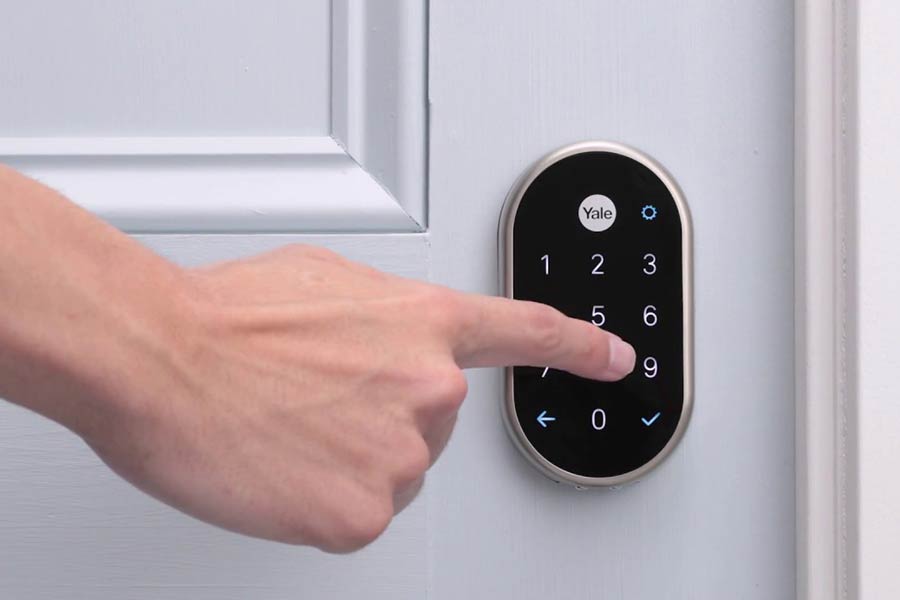
Nest smart locks are like the superheroes of home security. They let you in without keys, making life easy. Imagine never losing your keys again! These locks are not just smart; they’re super smart. While traditional locks need keys, Nest locks use your phone. It's like going from a horse and buggy to a sports car. With Nest, you control who enters your home, even when you're not there. It’s peace of mind in your pocket. If you want to feel safe and cool at the same time, these locks are for you.
Key Takeaways
- Easy to Install: Nest smart locks are simple to set up, even for beginners.
- User-Friendly: They offer a smooth experience with easy controls.
- Variety of Models: Different models fit different needs and budgets.
- Enhanced Security: Improve home safety with smart technology.
- Smart Features: Enjoy keyless entry and remote access.
- Purchase Tips: Check compatibility with your door before buying.
Understanding Nest Smart Locks
What They Offer
Nest smart locks offer keyless entry for homes. You don't need traditional keys anymore. Remote access is possible through smartphones. This means you can lock or unlock doors from anywhere. They also provide enhanced security features. These features help keep your home safe.
Key Features Overview
These locks include auto-lock and unlock functions. Doors can lock automatically when you leave. They have tamper alerts for added safety. If someone tries to break in, you get notified. The locks support voice commands via smart assistants. You can use your voice to control them easily.
Compatibility with Devices
Nest smart locks work with both Android and iOS devices. You can use any smartphone to manage the lock. They integrate with Google Assistant and Alexa. This allows for seamless control using voice commands. They're compatible with various smart home systems, making them versatile.
Security Benefits
They use encrypted communication for data protection. This keeps your information safe from hackers. User-specific access codes are allowed for each person. You can give different codes to family members or friends. Activity logs are provided for monitoring who enters and exits your home.
Installation Process
Step-by-Step Guide
First, remove the old lock from your door. Use a screwdriver to take out screws. Next, place the Nest Smart Lock on the door. Align it properly and secure it with screws. Download the Nest app on your smartphone. Create user profiles by following the app instructions. Finally, connect the smart lock to your Wi-Fi network through the app.
Required Tools and Equipment
You will need a few tools for installation:
- A screwdriver is essential for removing and attaching screws.
- A drill might be needed if new holes are required.
- Make sure to have a smartphone ready for setup.
- Insert batteries into the lock to power it.
Troubleshooting Common Issues
etimes, the Nest Smart Lock may not connect to Wi-Fi. Check if your Wi-Fi is working well. Restart your router if necessary. If the app doesn't sync, ensure your phone's Bluetooth is on. Reopen the app and try again. If batteries drain fast, use high-quality ones. Also, check if they're inserted correctly.
User Experience
Ease of Use
Nest smart locks are easy to use. The intuitive user interface makes it simple for everyone. Locking and unlocking is straightforward. A single tap can secure your home. Managing the lock through the mobile app is also easy. You can control everything from your phone.
Mobile App Integration
The mobile app offers real-time notifications. You know immediately if someone uses the lock. This helps keep your home safe. Remote locking and unlocking are possible too. If you forget to lock the door, do it from anywhere. The app design is user-friendly, making navigation simple.
Customer Feedback
Customers often praise Nest smart locks for reliability. They find them dependable for daily use. Many users mention the ease of installation in their reviews. It doesn't take long to set up. However, some people report connectivity issues sometimes. These complaints are less frequent but worth noting.
Comparing Models
Popular Models Overview
The Nest x Yale Lock stands out as a top choice. It offers keyless entry and integrates well with smart home systems. The Nest Secure model is another popular option. It features a keypad, motion sensors, and remote access capabilities. Each model has unique attributes. For example, the Nest x Yale Lock focuses on security with tamper alerts. Meanwhile, the Nest Secure provides comprehensive home monitoring.
Differences and Similarities
Battery life varies across models. The Nest x Yale Lock uses four AA batteries, lasting about a year. In contrast, other models may need more frequent changes. Design aesthetics also differ. Some locks have sleek designs, while others are more traditional. Despite differences, these locks share features like remote access and smartphone control.
Choosing the Right Model
Consider your home's size and layout when choosing a lock. Larger homes might benefit from the extensive features of Nest Secure. Evaluate compatibility with existing devices too. Some models work better with specific smart home setups. Lastly, assess budget constraints. Prices vary across models, so find one that fits your financial plan.
Buying Guide
Factors to Consider
Before buying a Nest smart lock, check the warranty and support options. Some locks come with a one-year warranty. Others may offer more extended coverage. Ensure you understand what is covered.
Review the installation requirements. Some locks need professional help, while others are DIY-friendly. Make sure it fits your door type and size.
Analyze the security features offered. Look for advanced encryption and two-factor authentication. These features help protect your home from unauthorized access.
Where to Purchase
Consider buying from the official Nest website. They often provide exclusive deals and bundles.
Major retailers like Amazon also sell Nest smart locks. They sometimes offer discounts or free shipping.
Visit local electronics stores to see the product in person. This allows you to ask questions and get advice from store staff.
Warranty and Support
Nest smart locks usually have a standard warranty period of one year. Check if there are options for extended coverage.
To claim support, contact Nest's customer service via their website or phone number. They will guide you through the process.
Customer service is available during business hours. They can help with troubleshooting, installation tips, and warranty claims.
Final Remarks
Nest smart locks are like having a digital bouncer right at your door. You've got the scoop on their setup, user-friendliness, and how they stack up against each other. It's clear these locks are more than just gadgets—they're peace of mind wrapped in tech.
re you ready to level up your home security game? Dive into the world of Nest locks. They're the key to a smarter, safer home. Don't just sit there—go explore the options and find the perfect lock that suits your style and needs. Your future self will thank you for it!
Frequently Asked Questions
What are Nest Smart Locks?
Nest Smart Locks are advanced security devices. They allow you to lock and unlock your door using your smartphone. Think of them as high-tech doormen that grant access with a tap or voice command.
How easy is the installation process for Nest Smart Locks?
Installing Nest Smart Locks is a breeze. Most models come with straightforward instructions and require basic tools. If you can handle a screwdriver, you’re golden!
What is the user experience like with Nest Smart Locks?
Using Nest Smart Locks feels like magic. You can control access remotely and receive alerts. It’s like having a personal security guard who never sleeps.
How do different Nest Smart Lock models compare?
Each model offers unique features. Some focus on convenience with keyless entry, while others emphasize security with advanced encryption. It's like choosing between a sports car and an armored vehicle—both have their perks!
Are Nest Smart Locks worth buying?
Absolutely! They enhance home security and convenience. If peace of mind had a price tag, it might just be the cost of a Nest Smart Lock.
Can I integrate Nest Smart Locks with other smart home devices?
Yes, you can! They play well with Google Assistant and other smart devices. It’s like having all your tech gadgets speaking the same language.
Do Nest Smart Locks work during power outages?
Yes, most models have backup options like physical keys or battery power. Think of it as having a spare tire for your front door—always ready when needed!